
In details we use HTML templates for almost every document which you might want to print or send out as a link.
HTML is the standard programming language for websites and yes, every document you create in details is actually a webpage.
The layout of those webpages is 100% fully customizable.
Some templates only we can change, but others, especially BOOKING documents like contracts, itineraries etc we make available in BOOKING / TEMPLATES
If you open a template in BOOKING / TEMPLATES you will see the code on the left hand side and all our variables (“Template Tags”) on the right hand side.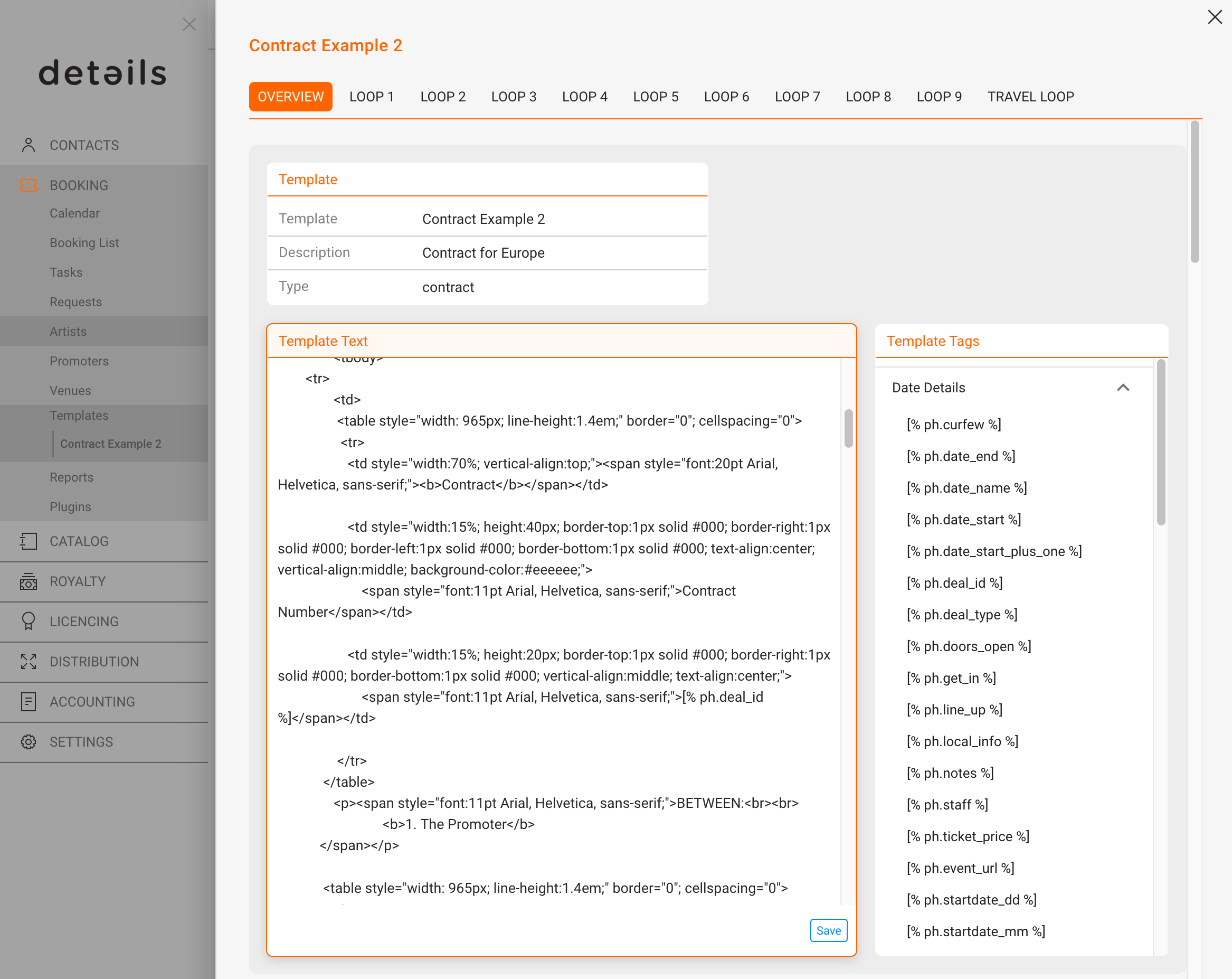
This means you can change and manipulate all your document templates for BOOKING yourselves.
NOTE: If you change templates yourselves, you will be responsible for the result!
You can easily adapt texts etc. but once you touch more complex issues like tables conditional clauses (IF ELSE) and calculations etc. it can get tricky! Find more information on how our templates work HERE.
Please be aware that changing templates includes the risk of breaking the HTML code, which will then need to be repaired.
You can always do this yourself in our HTML Editor or any other online or offline HTML EDITOR.
If you require our help, it will be billed at our current support rate.
This editor will allow you to change any text in your template. For advanced information on variables please check the respective WIKI articles:
Step by Step Guide to variables in a standard Booking Contract
BOOKING Template Editor
Recently Viewed
Your recent pages