
This article will show you how to create iCal subscription links for your artists, tour-managers or yourself.
details iCal links are validated in a standardized iCal format.
This file standard is used by other IT companies to create calendar events (for example Apple Calendar or Google Calendar).
In details you can create as many subscription links as you need.
There is no additional cost involved for anyone.
Subscription links are created “on the fly“, meaning that they are NOT SAVED anywhere in the system.
Everytime you create a link with a certain set of options it creates a new link.
Whatever link you create and send out, will work permanently (unless you change the username and passwords – then the existing links will not update anymore)!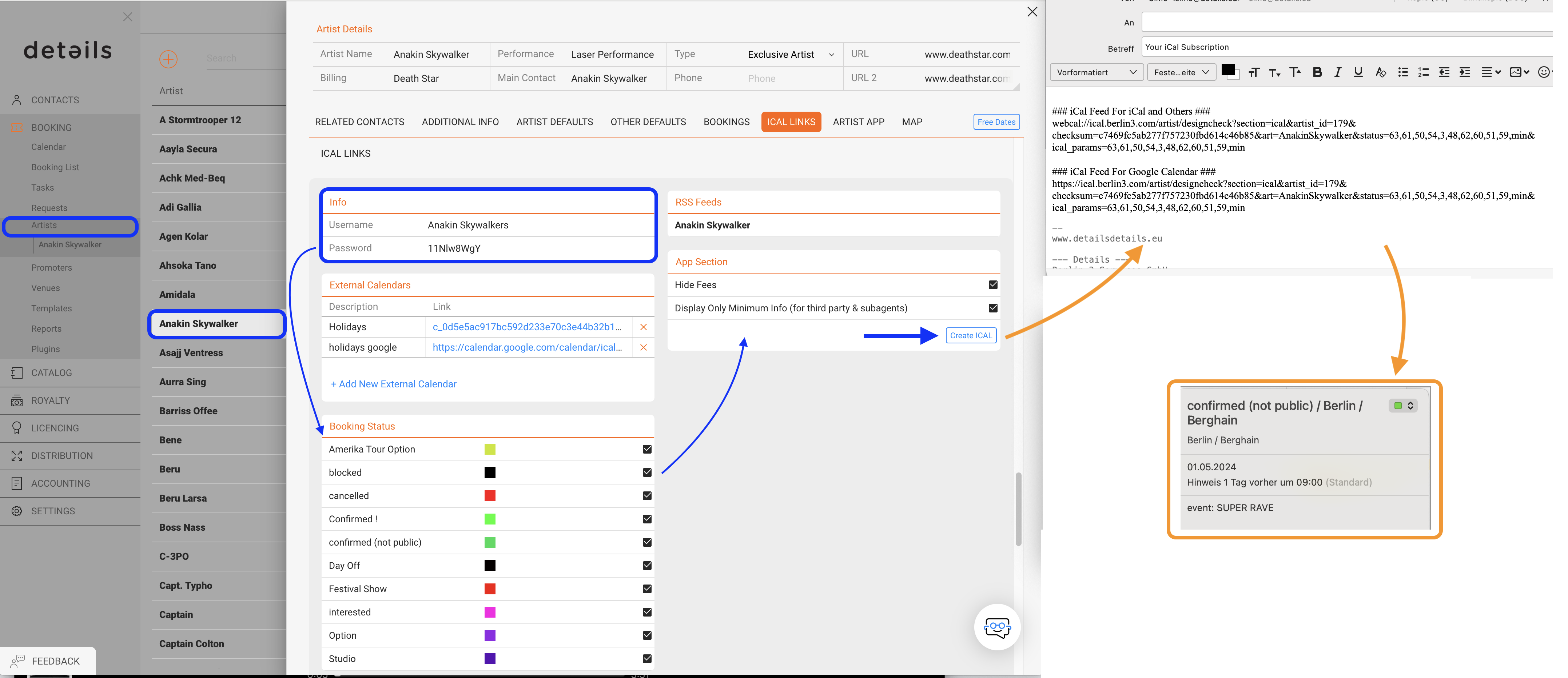
This is how you create iCal links:
Go to BOOKING – ARTISTS, select an artist and go to the ICAL LINKS tab
1) For NEW artists details will automatically set a username and password.
NOTE: You won’t need to give them to anybody, but it will be encrypted in app link.
Whenever you need to block the access to people who are subscribed to a link, just change the password!
2) Choose what Booking Status you want the other person to see (confirmed, cancelled..etc)
3) Select wheter or not you want fee information to be shared in the calendar.
NOTE: “Hide Fees” is checked by default which means that by default NO money information will be shared in the link.
If you do want the money details to appear in the link, de-select the checkbox.
4) Select wheter or not you want the iCal to display limited infos only.
NOTE: if this box is checked, the iCal will display DATE / ARTIST / VENUE / CITY / COUNTRY and STATUS only.
Any other logistics will only be displayed this checkbox is unchecked.
5) click on Create iCal to open an email automatically including the iCal-link. Send it to the recepient.
6) The recepient of the link should be able to subscribe to the iCal with any standard Calendar software.
You can find additional Infos about this here
* Calendar for Mac: Subscribe to calendars
* Google Calendar: Subscribe to other calendars
* Calendar in Details: Subscribe to other agencies iCal
NOTE: Here is an article why are past dates are removed from the iCal.
How to create Ical links (Calendar links)
Recently Viewed
Your recent pages