
This article will explain the relation between ARTISTS, their related CONTACTS’s bank infos and how to get those into templates for contracts, itineraries etc.
The picture below should give you an idea:
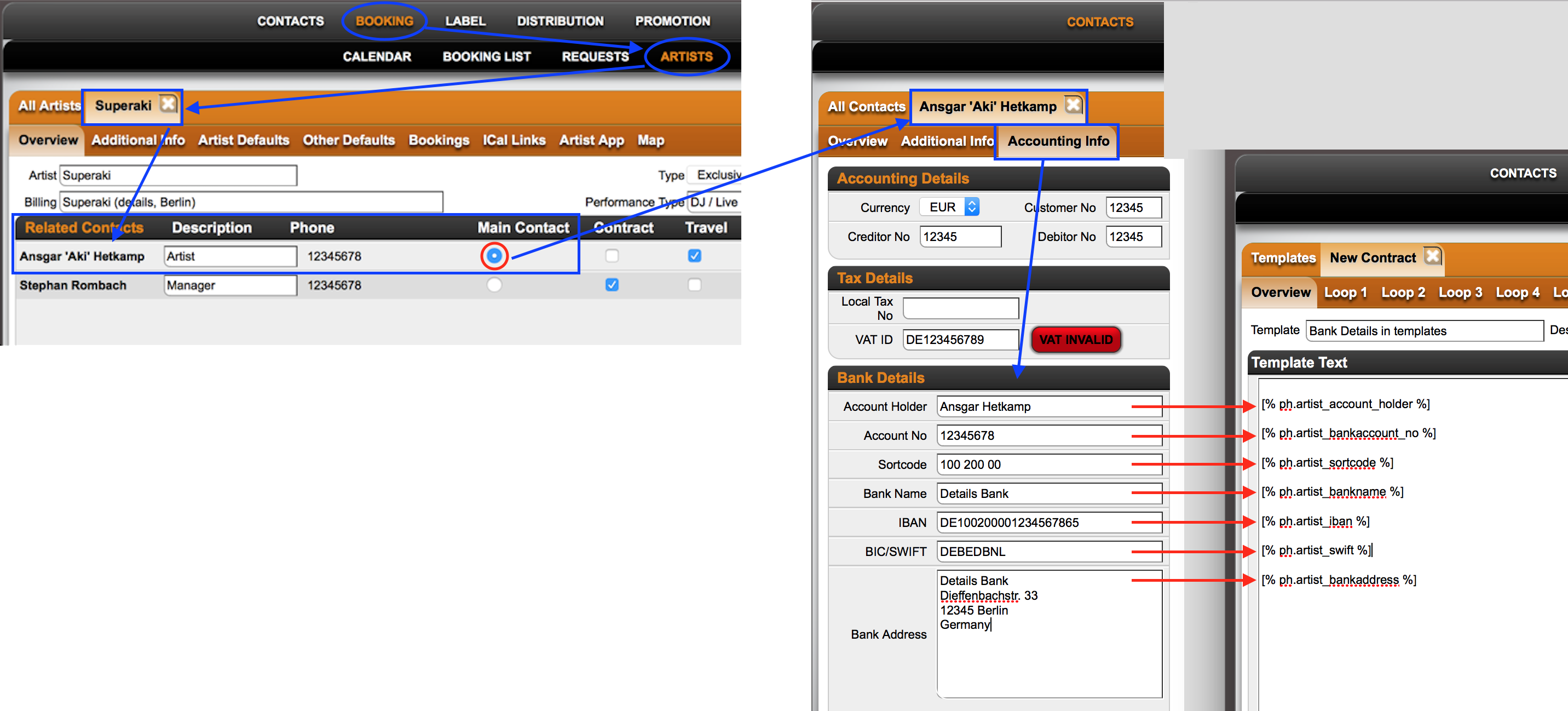
The most important thing to understand is that ARTISTS are related to one or multiple CONTACTS, i.e. real people or companies.
To pull bank details into a contract or itinerary you need to check the MAIN CONTACT, as selected in the list of related contacts with a radio button (highlighted in the picture in red).
Click on the name of the MAIN CONTACT and go to the ACCOUNTING INFO subtab.
Here you will find the fields available for bank details.
The bank infos of the MAIN CONTACT can be pushed to templates via the following VARIABLES:
Account Holder: [% ph.artist_account_holder %]
Account Number: [% ph.artist_bankaccount_no %] (now redundant in EU)
Bank Sort Code: [% ph.artist_sortcode %] (now redundant in EU)
Account IBAN: [% ph.artist_iban %]
Bank SWIFT: [% ph.artist_swift %]
Bank Name: [% ph.artist_bankname %]
Bank Adress: [% ph.artist_bankaddress %]
You can use these variables to pull your ARTIST’s main CONTACT’s bank infos into any TEMPLATE.