As you might discover, details offers TWO different links for external data entry:
a) REQUEST FORM
b) QUESTIONAIRE
The main difference between both is that
- QUESTIONAIRES are for SPECIFIC events with selected DATE, ARTIST(S), VENUE and PROMOTER where the
- REQUEST FORM link is NOT YET related to a specific booking.
The REQUEST FORM is a GENERIC form where promoters can actually suggest a date and one or multiple artists of their choice and send you a REQUEST. REQUESTS will appear in your inbox as email notification and in the REQUEST subtab of BOOOKING.
A REQUEST is NOT a BOOKING yet!
You`ll need to confirm the request to turn it into a booking date. The Request Form may be integrated into your website and may be adapted to your website style.
The QUESTIONAIRE on the other hand is related to a SPECIFIC BOOKING, which already exists as booking date in details. This is used to allow the promoter to add missing infos for deal & logistics for a specific booking that you are currently working on. It may include more fields sections, especially the LOCAL DETAILS, which are customizable in SETTINGS, such as Hotel Infos, Hospitality Infos, Drivers, etc. QUESTIONAIRE links can be send via the SHARE button which should open an email including the link. If not, try “open in web“► to send out the same link.
Filled QUESTIONAIRE Infos will be available in the SPECIFIC booking date.
Fields to display in
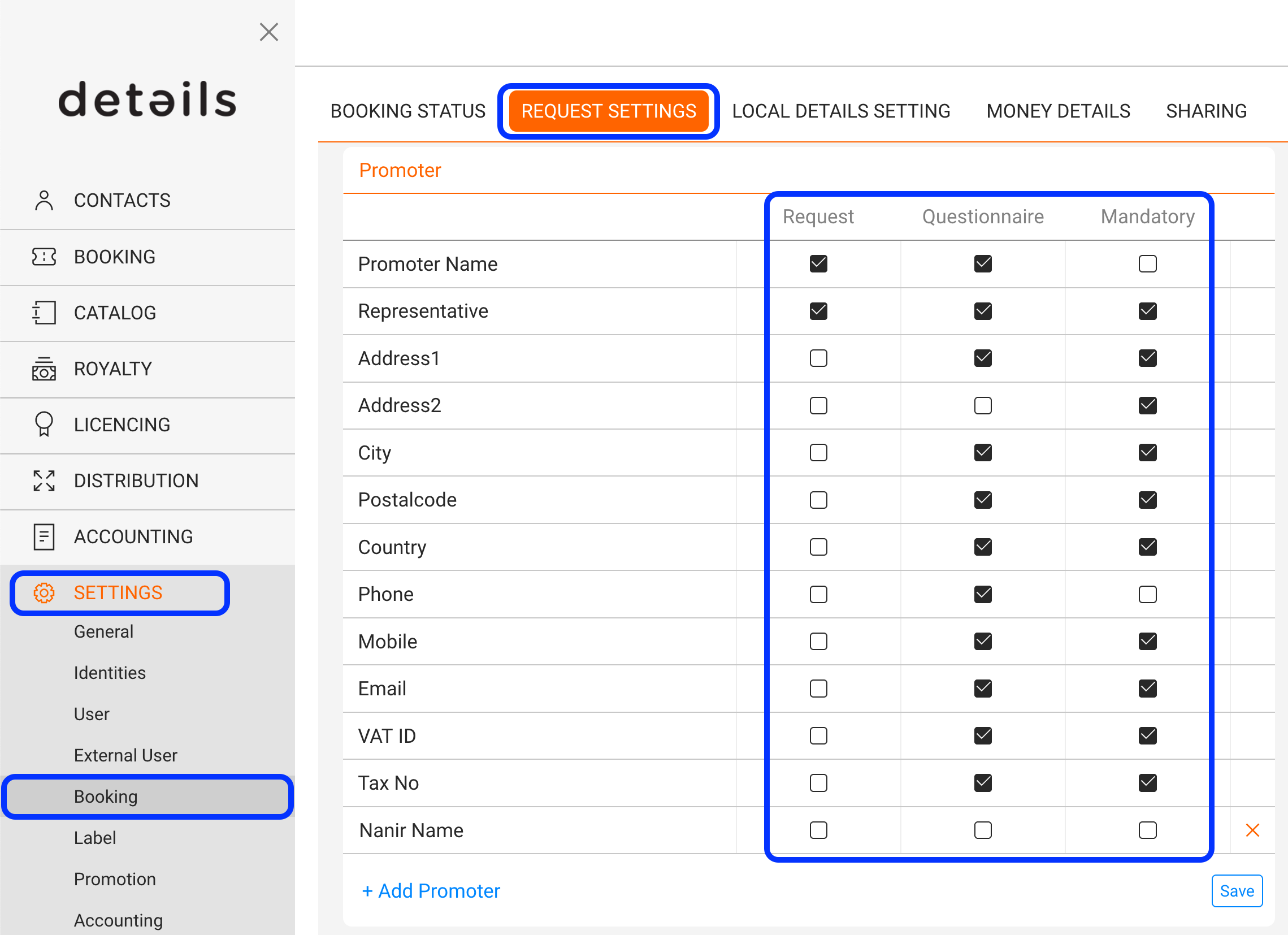
a) REQUEST FORM and b) QUESTIONAIRE are fully customizable in
SETTINGS / BOOKING / REQUEST SETTINGS
Select checkboxes in the REQUEST column of each section for the REQUEST FORM
Select checkboxes in the QUESTIONAIRE column of each section for the QUESTIONAIRE
Select checkboxes in the MANDATORY column to make a field mandatory for either a) or b) or both