
The embeddable Booking Request form can be styled to match the CI of your website.
Please make sure your page encoding should be utf-8 to display special characters for various languages:
meta http-equiv=”Content-Type” content=”text/html; charset=UTF-8″
The code you need looks like this
<script src='https://app.detailsdetails.eu/request/yourloginname/?artist_id=&lang=en&version=2' type='text/javascript' charset='UTF-8'></script>
You will find it in Settings – Sharing: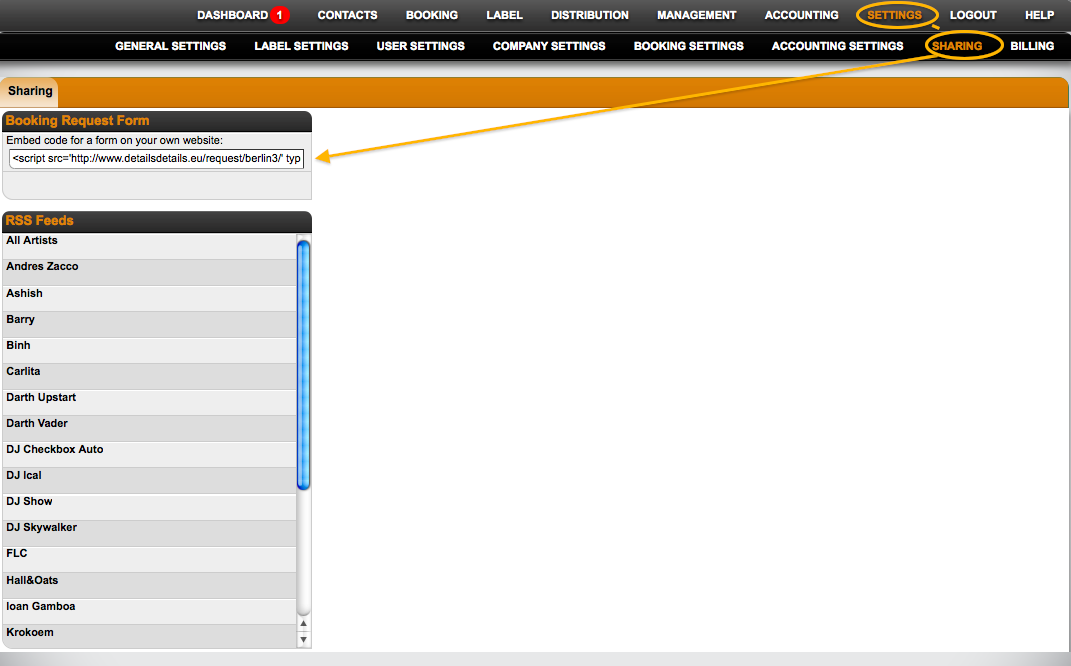
Below is a diagram illustrating the different classes and IDs that are available for CSS and other styling.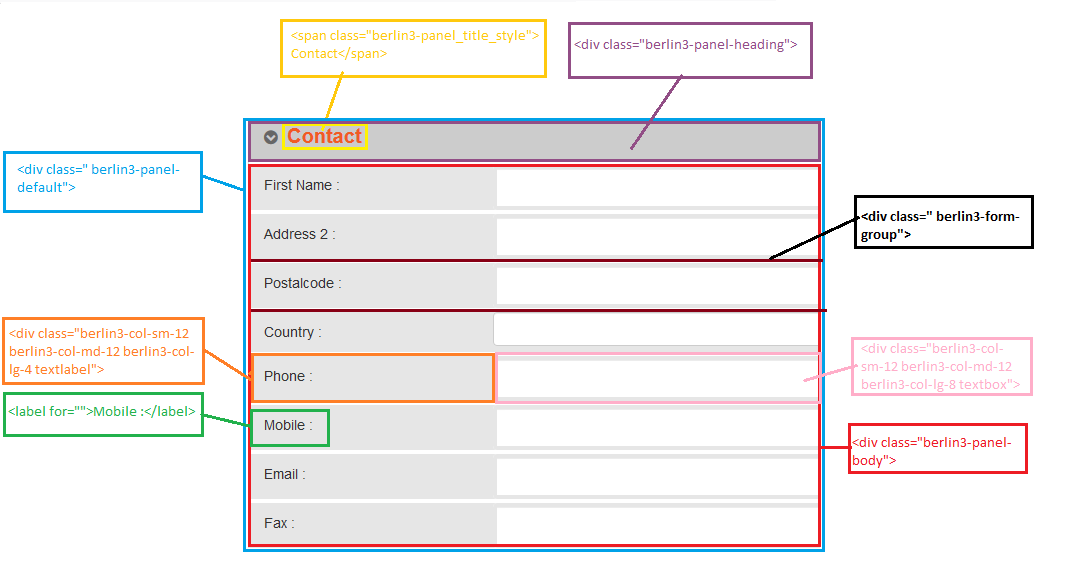
The following styles are declared and can be overwritten to customize your embedded request form:
img.client-logo {
}

ul.berlin3-lang {
}

li.berlin3-change_lang {
}

div#berlin3-calender_info {
 padding-left: 15px;
 font-size: 30px;
 color: #f15a24;
}

section#contact_request_form {
}

.berlin3-panel-default > .berlin3-panel-heading {
 background-color: #cccccc;
 background-image: none;
 background-repeat: repeat-x;
}

.berlin3-panel-title {
 margin-top: 0;
 margin-bottom: 0;
 font-size: 16px;
 color: inherit;
}

.berlin3-row.berlin3-form-group .textlabel {
 padding: 10px 0 10px 15px;
 background-color: #e6e6e6;
}

.berlin3-row.berlin3-form-group .textlabel label {
 font-weight: normal;
}

.berlin3-col-lg-8 {
 width: 66.66666667%;
}

.berlin3-col-lg-4 {
 width: 33.33333333%;
}

#berlin3-press {
 color: #FFF;
}

#berlin3-press .submit_status {
 padding-bottom: 10px;
}

#berlin3-submit {
 color: #fff;
}

.berlin3-btn_white_round {
 border-radius: 14px;
 background-color: #FFF;
 color: #f15a24;
 font-weight: bold;
 font-size: 17px;
 line-height: 0.9;
}

.berlin3-btn {
 display: inline-block;
 padding: 6px 12px;
 margin-bottom: 0;
 font-size: 14px;
 font-weight: normal;
 line-height: 1.42857143;
 text-align: center;
 white-space: nowrap;
 vertical-align: middle;
 -ms-touch-action: manipulation;
 touch-action: manipulation;
 cursor: pointer;
 -webkit-user-select: none;
 -moz-user-select: none;
 -ms-user-select: none;
 user-select: none;
 background-image: none;
 border: 1px solid transparent;
 border-radius: 4px;
}

.berlin3-bg_orange {
 background-color: #f15a24;
}

.berlin3-sub {
 text-align: center;
 height: 145px;
 vertical-align: middle;
 padding-top: 18px;
}

.berlin3-fixed_rightbutton {
 float: right;
 right: 0;
 left: 336px;
 top: 50%;
 width: 40px;
 height: 70px;
 padding: 6px;
 position: absolute;
 border-radius: 8px 0 0 8px;
 display: none;
}

.berlin3-rotated-text {
 display: inline-block;
 overflow: hidden;
 width: 1.5em;
}
Initially all panels of the form are closed. But If want the form is fully visible then the bellow javascript code can be used:
jQuery("#openall").trigger("click");
NOTE!!!
Because the stylesheet for the Booking Request form is loaded in the BODY section you will need to make sure that your stylesheet is placed or loaded in such a way that it overrides the default stylesheet of the form.
Also note, because of the highly technical nature of CSS design we cannot address questions about this topic without charging for support time.
All bugs are free-of-charge.
We have used Bootstrap front-end framework to design this. It can be follow Bootstrap CSS guide to change it’s style.
link:: http://getbootstrap.com/css/