
The Sales Imports section in details is the central workspace for importing, monitoring, and managing all incoming sales statements. It connects your distribution accounts with imported statements and provides a clear overview of your digital and physical revenue streams.
Tip: Each tile in this interface represents one Import Setup. You can create, track, and confirm sales statements directly from here.
OVERVIEW
Go to DISTRIBUTION / IMPORTS in the main navigation. The page displays a grid of tiles that represent your import setups per distributor, period, and currency.
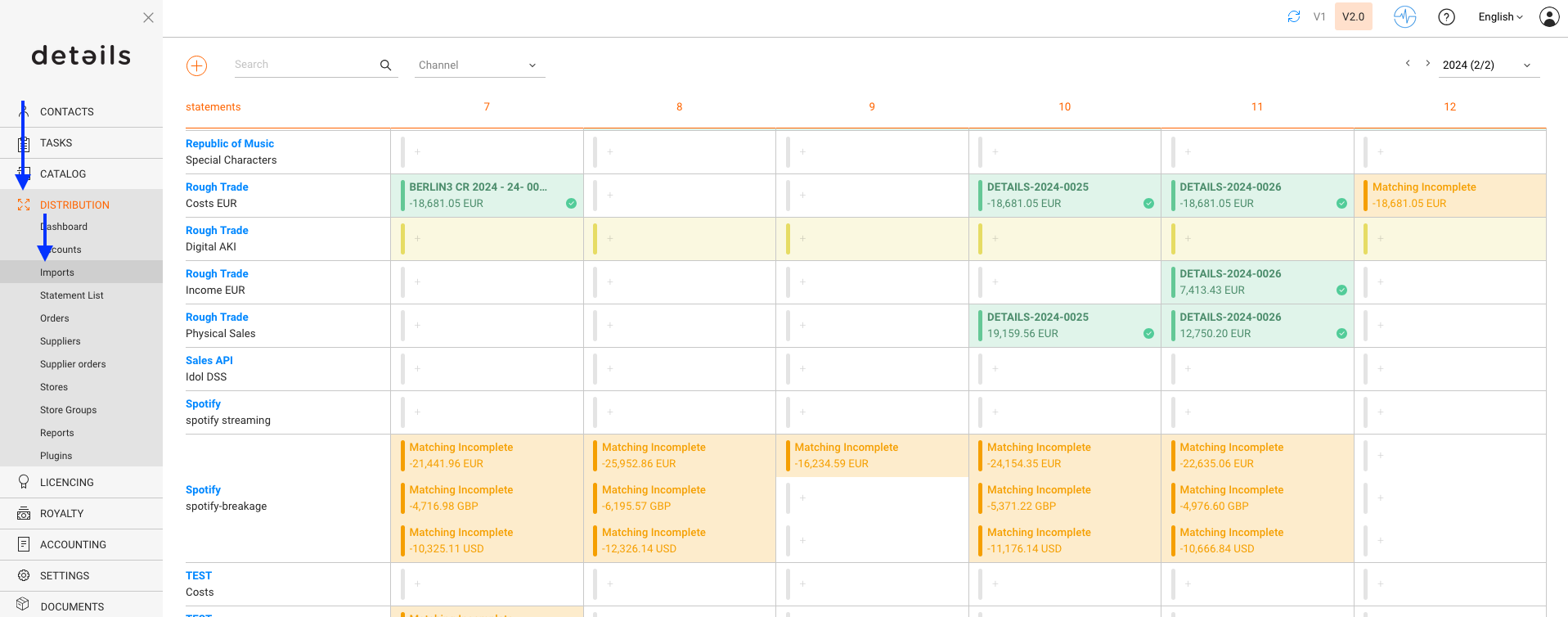
Each tile corresponds to one importer and sales period. From here, you can upload files, view automated ingestions, or check already confirmed statements.
COLOR & STATUS INDICATIONS
The color of each tile indicates the import s current status:
| Color | Status | Meaning |
|---|---|---|
| Yellow | Expected | An import setup exists, but no statement has been uploaded or received yet. |
| Orange | Matching Incomplete | A file has been uploaded, but the line matching is incomplete and has to be finished manually before the next steps can be taken. |
| Matching Complete | A file has been uploaded, and line matching is complete, but the import is not yet confirmed. | |
| Green | Confirmed | The import has been verified and accounted. The statement is now linked to an invoice. |
| Blue | Auto-Import Available | An Import is available via auto-ingestion, if configured. |
| Red | Double-accounted | Imported statement was accounted twice. Delete both related invoices and re-account. |
| Grey | Not expected | No statement expected for this period. |
ACCESSING IMPORT DETAILS
Click on any tile to open the corresponding side panel. From there, you can:
- See the import summary and statement period
- Open the related invoice or delete the import if needed
- Trigger automated ingestion processes (if configured)
NAVIGATION STRUCTURE
Inside each Distribution Account you ll find tabs that help manage related import settings:
- Current Statements All active sales imports
- Import Setup Configuration for automated or manual imports
- Archived Statements Confirmed and accounted historical imports