
On DISTRIBUTION / PLUGINS, details provides a range of optional tools and reports to make your daily distribution work more efficient. Some plugins are free of charge, while others may be billable.
If additional costs apply, this will be indicated in the description.
To activate a plugin, click on [Activate] next to the plugin name. Once activated, you can access its functions via the corresponding icon. A module window will then open to proceed.
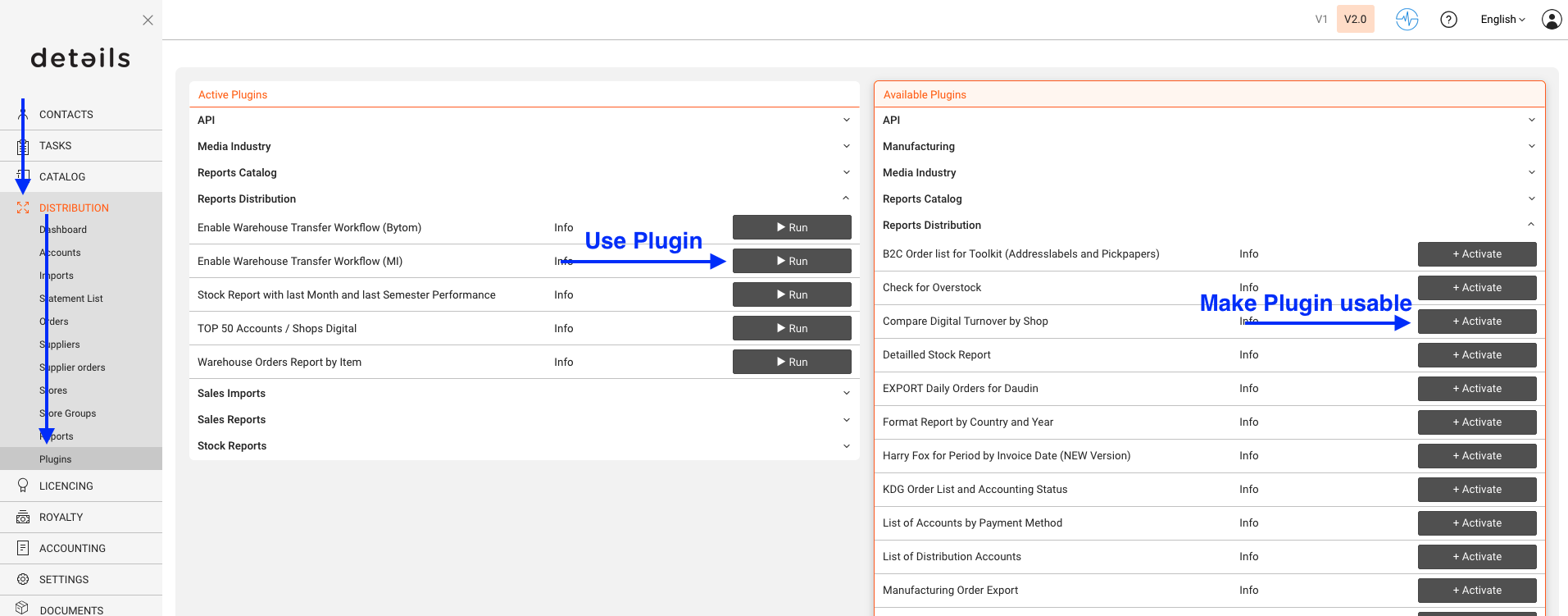
►
Below you find examples of distribution-relevant plugins currently available in details.
For a complete list of available distribution plugins, check the PLUGINS section in your account.
► Check Statement Matching
Exports imported lines by identifier with matching information to help verify your distribution statements.
Access via DISTRIBUTION / PLUGINS / Sales Imports
► Order Discount
Enables you to add discounts to distribution orders directly within the system.
Access via DISTRIBUTION / PLUGINS / System.
► Order Import (XLS)
Allows you to import Excel files containing distribution orders, simplifying bulk order management.
Access via DISTRIBUTION / PLUGINS / System.
► Automatic Statement Importing
Provides automatic importing of statements from multiple shop or distributor formats, reducing manual work and ensuring consistency.
Access via DISTRIBUTION / PLUGINS / Sales Import.