
Table of contents
The Bandcamp Plugin in details allows you to synchronize and manage sales and catalog data between your details account and your Bandcamp store. It is designed for labels and distributors who sell music or merchandise directly via Bandcamp while keeping all reporting and royalty data centralized in details.
Overview
The plugin connects Bandcamp’s sales and product data to details through automated imports. It enables the synchronization of catalog entries, sales reports, and accounting data to ensure that your Bandcamp activity is reflected accurately in your royalty statements.
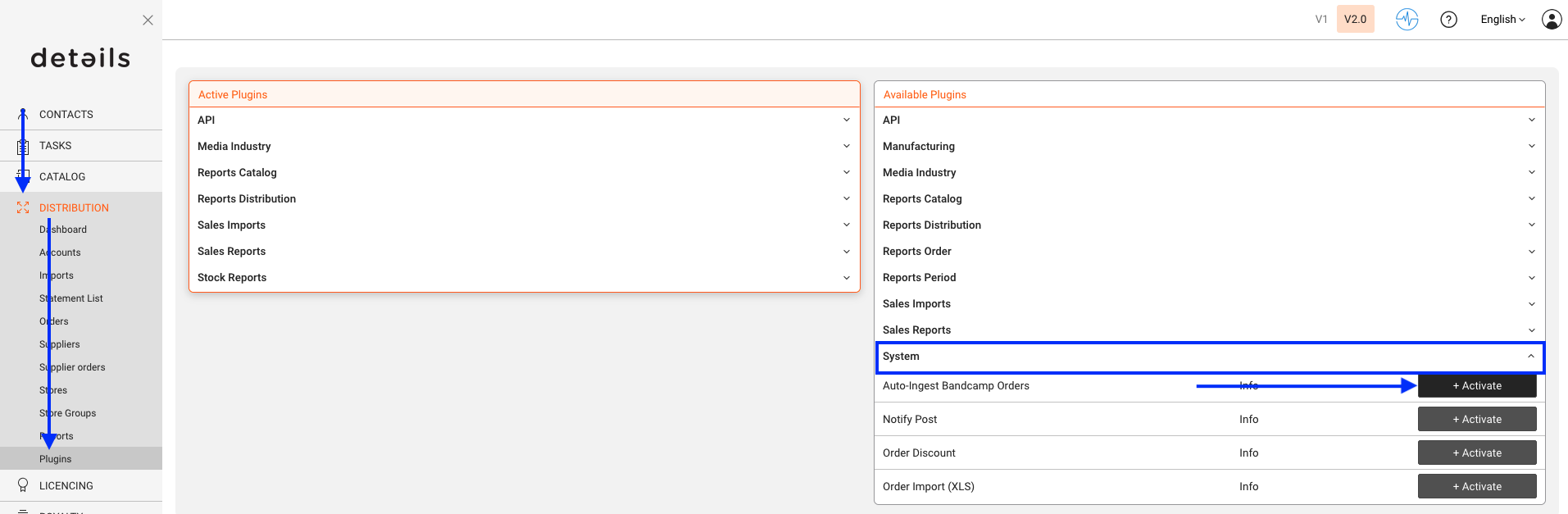
This plugin is available under DISTRIBUTION / PLUGINS. Once activated, it appears as a separate module within the DISTRIBUTION section.
Setup
To activate and configure the plugin:
- Go to DISTRIBUTION / PLUGINS and locate Bandcamp in the plugin list.
- Click [ACTIVATE] to enable the plugin for your account.
- Once activated, open the plugin settings by clicking the Bandcamp icon.
- Enter your Bandcamp account credentials or API token (depending on your access type).
- Confirm your setup by clicking [SAVE].
The connection allows details to pull sales reports and catalog data directly from your Bandcamp shop, keeping both systems aligned.
Workflow
Once activated and connected, the Bandcamp Plugin performs two key functions:
- Catalog Matching: The plugin automatically compares Bandcamp product data (albums, tracks, merchandise) with existing catalog entries in details. If matching identifiers are found, the products are linked automatically.
- Sales Import: Bandcamp sales data (downloads, vinyl, CDs, merchandise) are imported and mapped to your royalty system. This ensures that all Bandcamp revenues appear in your distribution reports and artist statements.
Each import session generates a report under DISTRIBUTION / SALES IMPORTS, showing the number of matched, unmatched, and newly created entries. Unmatched lines can be manually linked to existing products or ignored if not relevant.
Notes & Limitations
The Bandcamp Plugin is intended for labels and distributors managing their own Bandcamp accounts. It does not support artist sub-accounts or third-party Bandcamp logins.
Automatic imports rely on your Bandcamp data export settings. Ensure your Bandcamp account has report access and that your login or token remains valid. If an import fails, check your API credentials or reauthorize the plugin.
The plugin is optimized for catalog synchronization and royalty reporting, not for direct content uploads or price management. Those actions must still be performed directly on Bandcamp.
With the Bandcamp Plugin, your Bandcamp sales and catalog data stay in sync with details, ensuring complete and accurate royalty management for your artists and partners.