
Royalty Accounts are your business partners from whom you have licensed music etc. and to whom you must send royalty statements.
If you have different contracts with one account, you can just add multiple contracts to one account.
Watch a TUTORIAL videop about how to create ROYALTY ACCOUNTS and CONTRACTS for artist releases here.
Each ROYALTY ACCOUNT has the subtabs Setup, Contracts, Recoupable/Costs, Statements and Balances which are explained step by step below.
”Excursions”
* HOW TO SET UP A NEW CONTRACT – ARTIST RELEASE
* HOW TO SET UP A NEW CONTRACT – COMPILATION
* CREATE ROYALTY STATEMENT
To create a new ROYALTY ACCOUNT, go to LABEL / ROYALTY and click [+] on top right of the list.
Enter the ACCOUNT NAME, ROYALTY PERIOD and choose an INVOICE PROJECT for the statements.
Click OK and you will be directed to the account’s SET UP subtab where you can choose a main contact and add more contacts if wished, add notes and upload related files such as Licence agreements, HOAs etc.
It is essential to choose an ACCOUNT BASE for the statements which defines to which date/period the income of a sale is collected to and hence accounted to your royalty statements.
There are three options:
* Payment Period: All income of sales will be collected to the period in which the invoice for the sales income has been paid by the sales account.
* Sales Period: All income of sales will be collected to the period of the actual sale.
* Invoice Date: All income of sales will be collected to the period in which invoice has been created.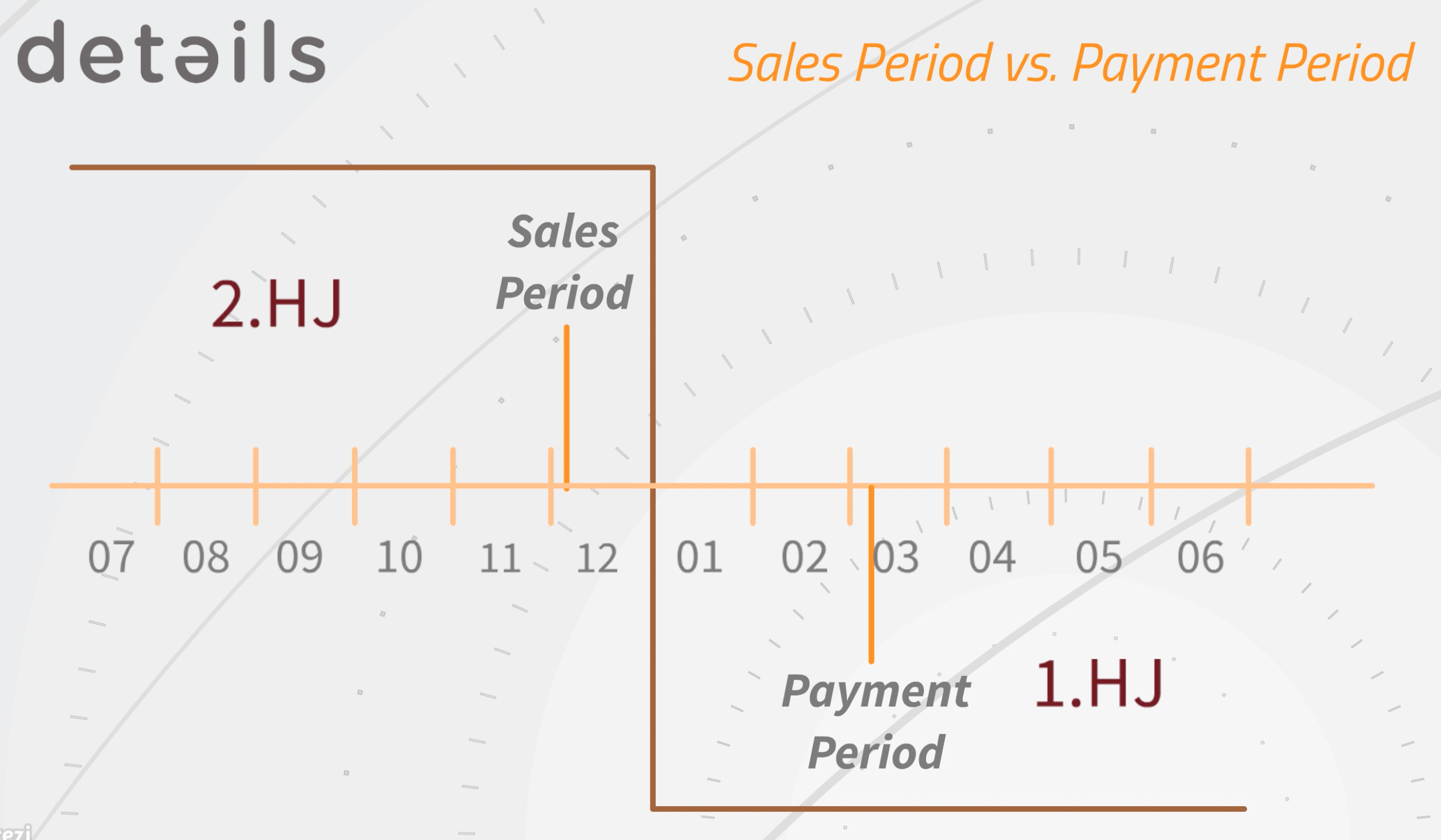
”Example”
Your records have been sold in December 2016. This is the SALES PERIOD.
If you select SALES PERIOD as royalty base, the income will be accounted in the royalty period 2HJ 2016 or Q4 2016 if you account quarterly.
You will probably receive and import the sales statement from your distributor in January 2017 and create an invoice or receive a credit note dated January 30th 2016. This is the INVOICE DATE.
If you select INVOICE DATE as royalty base, the income will be accounted to the period 1HJ 2017 or Q1 if you account per quarter or 01 2016 if you account monthly.
Then you will probably not receive any money and the invoice in ”details” will not be selected as “paid” before March 2016. This is the PAYMENT PERIOD.
If you select PAYMENT PERIOD as royalty base, the income will be accounted in the period 1HJ 2017 or Q1 if you account per quarter.
Please note that you should NEVER change the account base after you have created and send out a royalty statement.
If you change the ACCOUNT BASE after you have already created a sales statement for your royalty account, it will happen that you account particular sales in several periods OR that you do not account particular sales at all.
Contact details support if you need help!
On the subtab CONTRACTS you can ADD A NEW ROYALTY CONTRACT, edit and delete existing contracts.
The subtab RECOUPABLE/COSTS shows you all costs related to the specific ROYALTY ACCOUNT.
The button ACCOUNT ALL RECOUPABLES will account all listed RECOUPABLE COSTS in one go if not accounted yet.
By ticking Ignore you can exclude single COSTS.
On the subtab STATEMENTS you can look up all past ROYALTY STATEMENTS for this ROYALTY ACCOUNT.
The subtab BALANCES shows allover royalty account related costs of the current royalty period
such as return reserves and closing balances of past royalty statements. If you create your first royalty statements with►details these might need to be set up manually. Ongoing, credit return reserves and closing balances are automatically created and carried over.
All contract related RECOUPABLES of the current royalty period are listed here as well.
It is important to know that contract related recoupables will be separately set off against royalties from the particular contract only, whereas balances (general royalty account costs) will be set off against the sum of all contract’s royalties.
To set up balances manually, click [+] on top right of the list.
Here you can add the DATE, DESCRIPTION, TYPE and AMOUNT.
Negative amounts will be accounted as DEDUCTIONS, positive amounts as ADDITIONS.
ROYALTY ACCOUNTS and how to set them up
Recently Viewed
Your recent pages