
Structure of invoices in details:
We display all relevant information about any invoice in details on 4 tabs:
1) overview
2) invoice lines
3) payments
4) forwarding re 1)
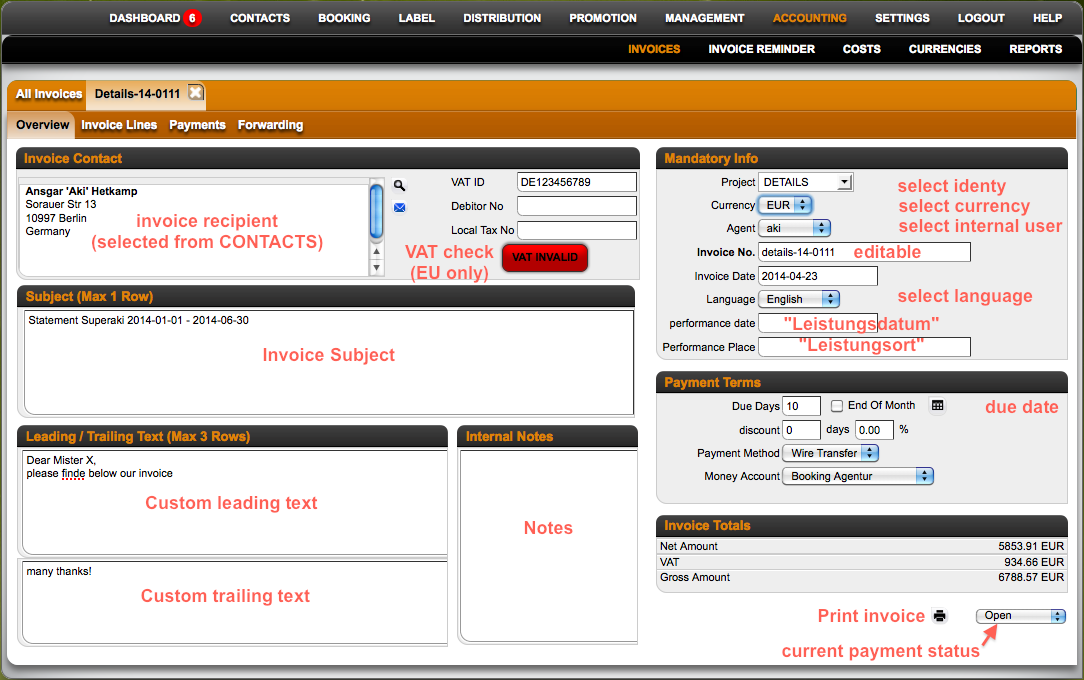 On the overview you can find the most important accounting facts about the selected invoice:
* the invoice recipient which is selected from the CONTACTS section via the eyeglass icon
* their VAT ID including a VAT number check for EU based companies
* the invoice subject * optional text fields for custom leading and trailing texts
* a field for internal notes
The “Mandatory Info” section allows you to doublecheck such important invoice facts as
* the invoice project (the selected invoice identity) * the selected currency
* the selected user
* the pre-filled, but editable invoice number
* the pre-filled, but editable invoice date
* the selected invoice language
* the performance date and place (required for German clients as “Leistungsdatum” and “Leistungsort”)
The “Payment Terms” section allows you to doublecheck
* the due date of the invoice
* optional discounts
* the selected payment method
* the selected money account
Note: Each invoice can only have ONE due date! This due date will be referred to in the Invoice Reminders. Different due dates by invoice line will be displayed in the invoice lines, but will not trigger our automatic reminders!
There is also a “Invoice Totals” section on the overview which shows you the total net, vat and gross balances. At the very bottom of this page you on the right you will find another print icon and a display of the current payment status.