DETAILS allows you to customize your own presets for specific booking arrangements.
Configure Artist- and Booking Fees, Deposits or Travel Expenses and their usage any way you need in SETTINGS > BOOKING > MONEY DETAILS.
Whenever those INVOICE ITEMS are used in any specific booking, they may automatically be transferred to contracts, itineraries, invoices as well as to the ARTIST APP.
We have populated the SETTINGS with a default set of INVOICE ITEMS.
ADD NEW items by clicking on the green PLUS icon on the very right of the top box.
EDIT existing items by clicking on the blue EDIT icon in each existing line.
REMOVE existing items by clicking on the red X icon in each existing line.
NOTE: Be aware that removed items will not only be not available for future bookings, but also be deleted in past and present bookings! Existing Invoices however will not be modified.
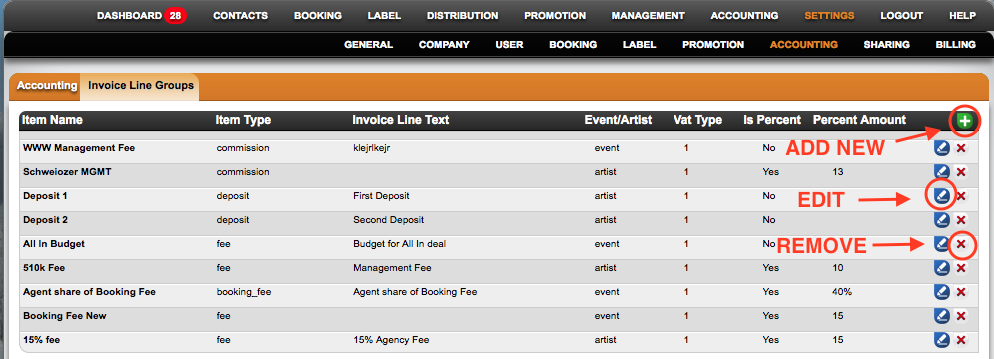
Each INVOICE ITEM can be set in the following screen:
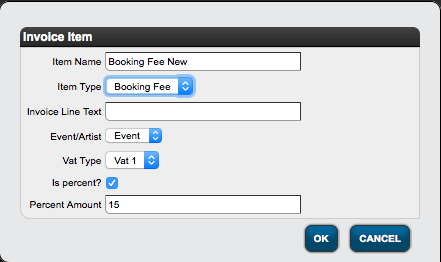
* First setting is the Item Name
* Select one of the available Item Types:
”FEE”: use for any kind of artist income or landed fees
”DEPOSIT”: use for artist fee deposits
”BOOKING FEE”: use for agency fees which go ON TOP of the artist fees
”COMMISSION”: use for agency commissions which will be deducted from FEES
”EXPENSE”: use for any kind of cost or expenses related with a booking
* The Invoice Line Text allows you to adapt the wording of the description on the Invoices.
NOTE: You may include the following variables in the description texts:
”#artist#” will include the specified artist name in the invoice line
”#duedate#” will add the duedate selected in this invoice line
* Select whether the current item will be PER ARTIST or PER EVENT on the Event/Artist dropdown.
* Select whether the current item will PER DEFAULT have a VAT type 1 or 2 or NO VAT.
VAT 1: use if this item typically needs full VAT rate
VAT 2: use if this item typically needs half VAT rate
No VAT: use if this item typically doesn►t need any VAT
* If the item typically is a percentage of other values within the deal, you can set a default percent rate and DETAILS will help you calculate those percentages in your booking deals.
* The default percent rate is set in Percentage Amount__
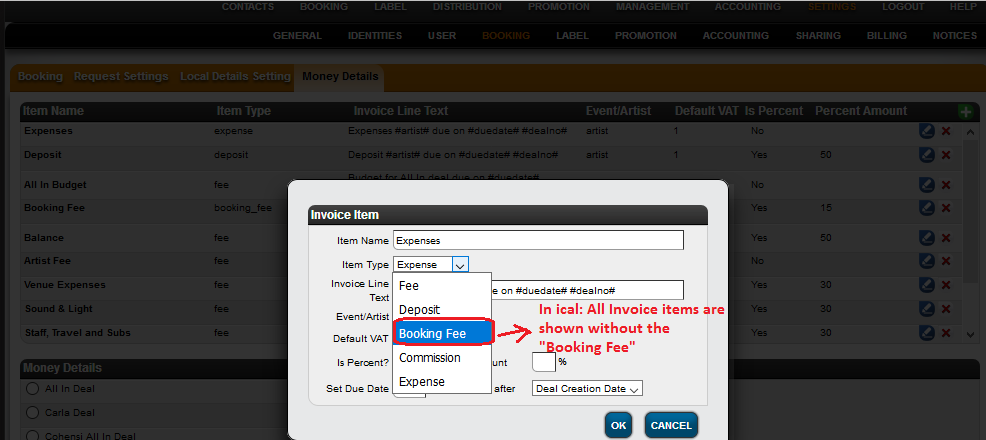
* There are two more options for being availability of invoice items in Artist app and ical.
That is:
** 1)In Artist App : Shown only “fee & expense” type invoicelines .
Screenshot: 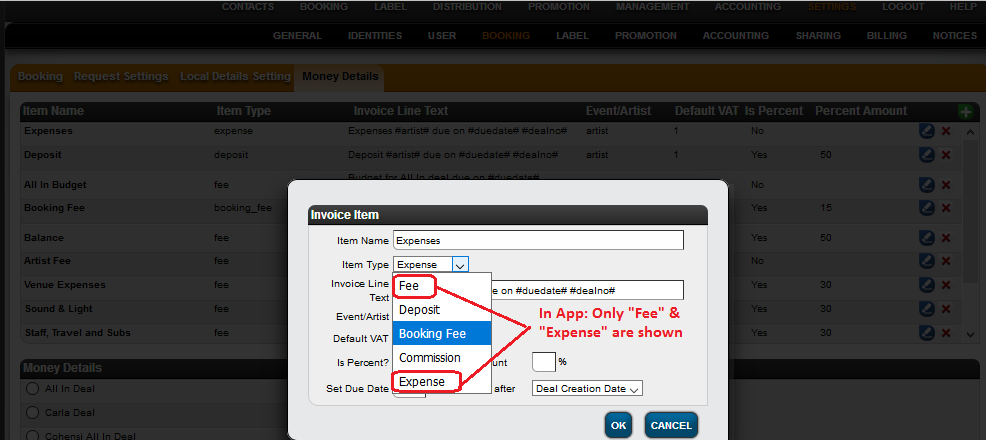
** 2)In ical : Shown all types of invoicelines without “booking_fee”
Screenshot: