
If you want to account digital income to your royalty accounts in detYils, you will need to add one or more digtal royalty options. Click the (+) icon on the contract’s Royalty Rate tab.
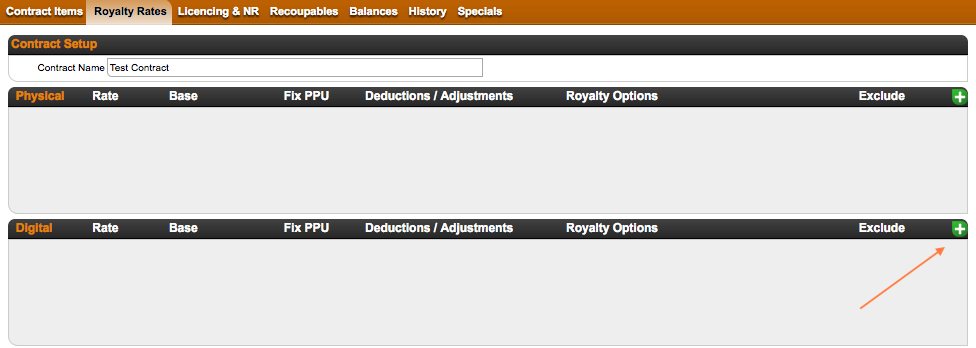
You will see a modal window with multiple options to set your royalty rate etc. for digital sales:
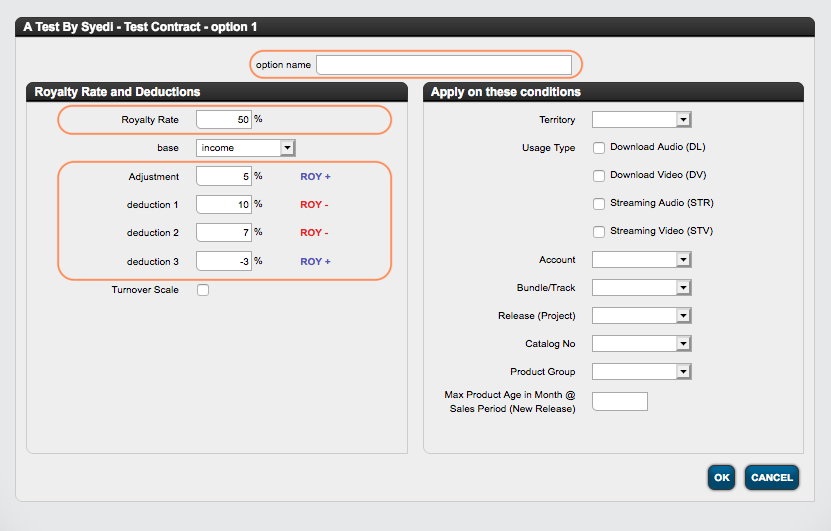
- If you have multiple calculation rules, please give your calculation rule an option name.
- In the field royalty rate field on the left side of the modal window, enter the digital royalty rate, which you want your royalty account to receive according to the contract.
- Establishing the base for the calculation is the next important step. For Digital this is most likely to be “income“, as other available base options are not common for digital sales.
- For each calculation rule you may also set adjustments and up to three optional deductions, which be applied to the calculation depending on the sign of the deduction/adjustment.
NOTE : While the deductions are displayed to the royalty owner in his statement, an adjustment remains undisclosed. An adjustment is therefore a percentage based reduction of the royalty calculation without any indication in the statement.
On the right-hand side of the modal window, you can define the conditions for which the current calculation rule will apply. Find out more about the available conditions here!
Think of the conditions as a filter that triggers the application of the current rule.
IMPORTANT NOTE : If you have more than one royalty option in one contract, please be aware that the calculation in detYils starts with the first rule and then continues with 2,3, etc. until the last one – the general royalty rule, which catches all sales that do not fall into any of the previous options.
