
To add advances and costs to your releases go to Label > Releases, search the corresponding release and click to open. Go to subtab Costs.
To add new costs, click the green Plus on top right. On the modal fill in mandatory fields:
Cost Date
Description
Cost Group (managed on Settings > Accounting)
Currency
Amount Original Currency
The Amount System Currency will be calculated by details according to your current exchange rates (managed on Settings > General)
Company, Document Ref and Payment Date are optional fields and can always be blank.
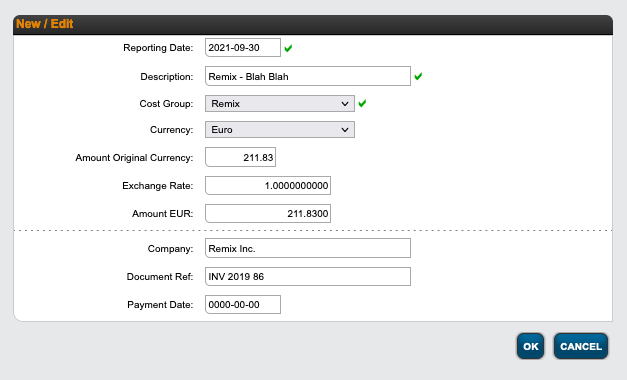
To add an Advance, just select cost group Advance. These are automatically set to 100% recoupable.
On Account Recoupable in the right column Recoupment you can now account costs / advances to the related royalty accounts and the accounted amount will be displayed. On click you can see all details of the Recoupables.
If the Recoupment status shows No Recoupable the related contract is set to Do Not Recoup.
If you want to add costs / advances to a specific product of a release, you can follow the above steps on the corresponding Product subtab Label > Product > Costs.
HERE is a tutorial video about how to add Advances and Costs.
Find out HERE how to upload proof for costs to your documentation.
If you feel, you have too many costs to enter manually, details also allows to import costs from an excel sheet.
Download a sample sheet HERE.
Check this tutorial on how to import Costs from an excel sheet