
Table of contents
The .shares Dashboard gives artists, managements, and partners secure online access to their royalty statements. This article explains how to set your password and log in for the first time.
Note: Access to the .shares Dashboard is provided via an email invitation. If you haven’t received one, please contact your label or royalty administrator.
Step 1: Start Login
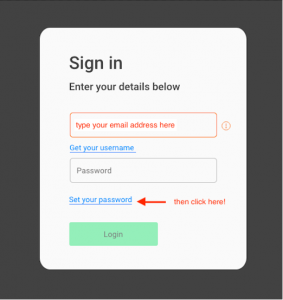
Go to the login page of the .shares Dashboard. Type your email address and click Set your password.
Step 2: Request a Recovery Link
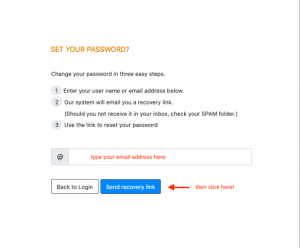
Enter your email again and click Send recovery link.
Step 3: Check Your Email
Look for an email from do-not-reply@details.eu and click Set Password.

Step 4: Set Your Password
Enter your new password and click Reset.

Step 5: Confirm the Password Reset
You’ll receive another email. Click Login.

Step 6: Log In to the Dashboard
Enter your email and password, then click Login.
Step 7: View Your Statements
Click a year to view your royalty statements.

Tip: Bookmark the login page for quick access.