
This help will show you how to navigate through the “INVOICE REMINDER” section of the ACCOUNTING menu.
1) To create a new run of invoice reminders, click the PLUS icon in Accounting / Invoice Reminder

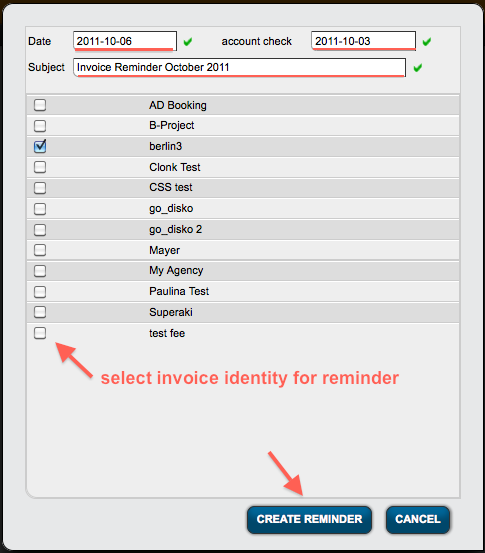
2) In the modal window select
a) date: the date of the reminder (default = today)
b) account check: the date when you last checked the bank account (default = today)
c) subject: an optional subject / title
d) select one or multiple invoice identities to include in your reminder To confirm your selection click CREATE REMINDER (or go back with CANCEL)
… a new invoice reminder will be displayed in the list!
3) If you click on the bold date of the new invoice reminder you will open it and see the list of invoice recipients that have open invoices (as of last bank account check). Each invoice recipient with at least one open invoice will be displayed seperatly with the amount of open invoices and the total amount owed (one line per currency).
You can now either:
4a) dig deeper into each contact by clicking on their name (in bold)
4b) click on the print icon to create an document with the reminder info
4c) click on the email icon to create an email with the reminder info 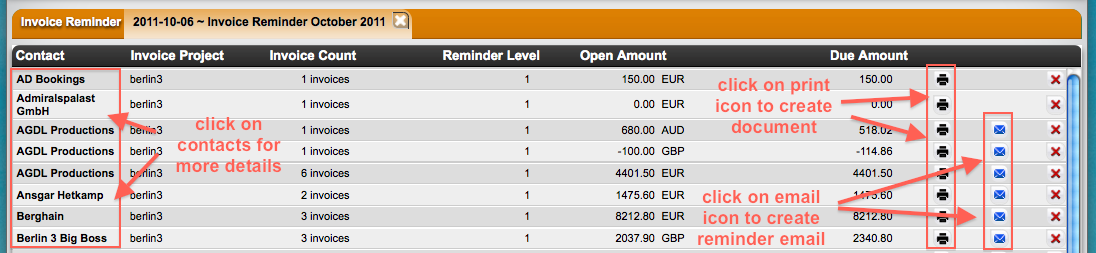
4) a) clicking on a contact will take you a a modal window where you see each invoice that seems open to details and their dunning level. If you want to exclude one or multiple invoices from the current reminder, just remove them from the list with the X icon.
b) clicking on the print icon will create a new document with the reminder info for the selected contact. A selection modal window will ask you to select a document template of your choice. Make sure you have a invoice reminder template: Check this Wiki about more info on creating a template for documents or contact us if you need help!
c) click on the email icon will open a new email with the reminder info already in .. ready to be sent with any greeting you wish to put in.
5) Each new invoice reminder will increase the dunning level of an open invoice.