
Details provides a feature to help you set up contracts efficiently using the copy contract function. This allows you to replicate an existing contract, including all associated items such as repertoire, share, royalty, licensing, and recoupable rates.
Step-by-Step Guide
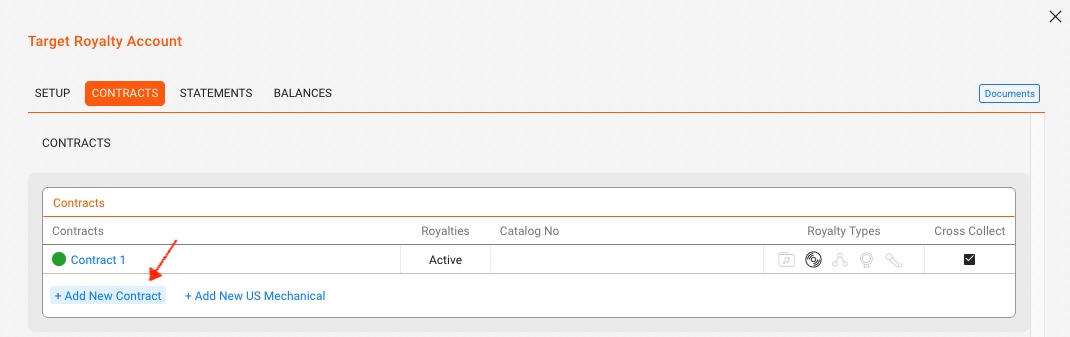
1. Navigate to the Target Royalty Account
Go to the royalty account where you want to add a new contract.
Open the Contracts subtab.
Click +Add New Contract to set up a new contract.
2. Initiate the Copy Contract Process
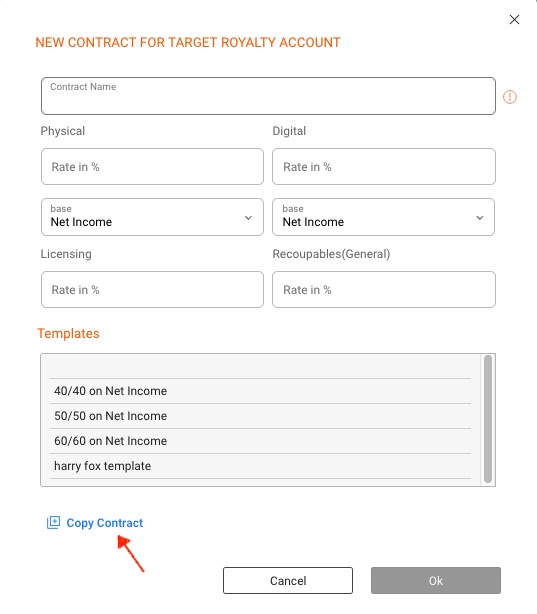
In the contract modal, click the COPY CONTRACT button.
3. Select the Source Contract
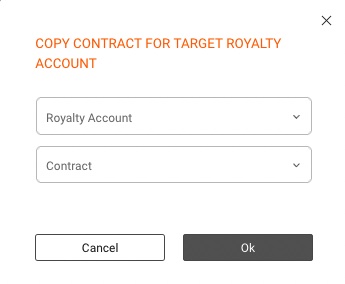
Choose the ROYALTY ACCOUNT and the specific CONTRACT you want to copy.
Click OK to proceed.
4. Modify the New Contract (if needed)
The new contract will open, allowing you to make any necessary additional changes.
By following these steps, you can efficiently copy and modify contracts, ensuring accuracy and consistency across your royalty accounts.
For further guidance, read here how to create contract templates.