
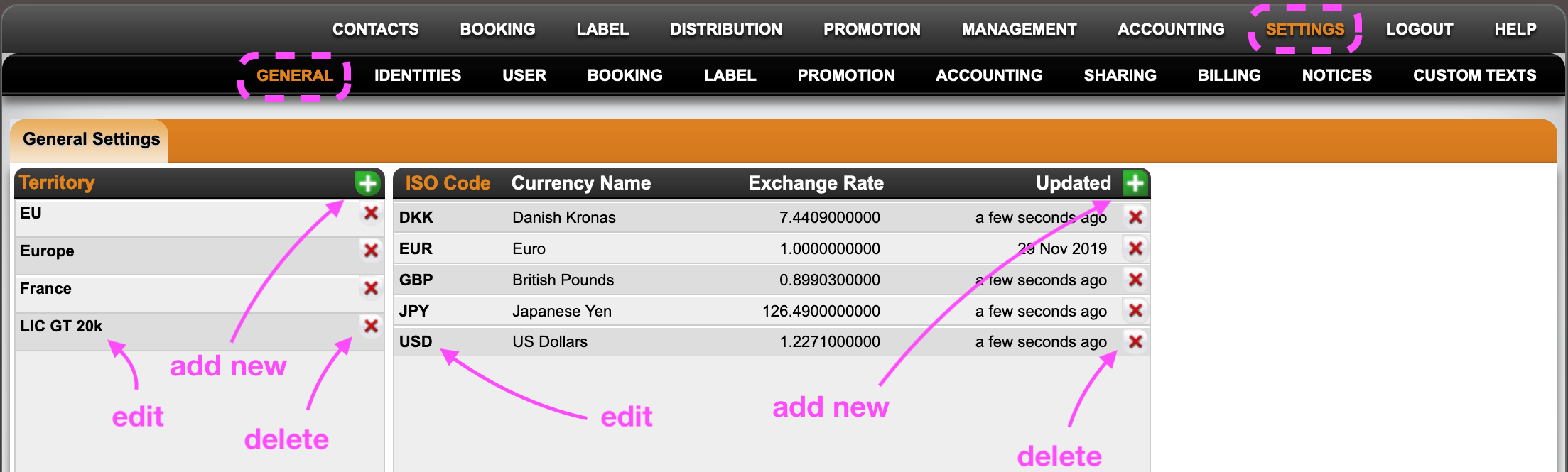
In SETTIINGS / GENERAL you can
- manage territories
- manage currencies
Manage Territories
Territories are mainly used in the LABEL & DISTRIBUTION modules to customize your own groups of countries, such as the EU, Scandinavia, GSA (Germany Austria Switzerland), North America, etc. You can then use those territories to apply specific ROYALTY calculation rules or distribution permissions for products in PRODUCTS / SPECIALS.
To add a new territory, click on the green PLUS icon, choose the countries from the list, enter a territory title and confirm with OK.
You can EDIT a territory by clicking on the BOLD territory title and select or de-select countries.
*2021 update: If you have created a territory for the EU, make sure to remove the UK.
To DELETE a territory you need to click a red x icon in the list.
Manage Currencies
At detYils we manage currencies on different levels and for different purpuses. A classic is that you may create invoices in different currencies and need to convert the paid amounts into your system currency (i.e. fiscal currency). THis may be important for financial reporting, royalty payouts etc.
You may manage your standard currencies and their exchange rates in SETTINGS.
We do offer a Plugin that will automaically update your default currency exchange rates every sunday night. The data source for our automatic updates is the European Central bank. Find out more about the exchage rates we use to update HERE.