
Table of contents
This article explains how Formats and Format Groups work in details, how they impact royalty calculation, and how to configure them safely. It is written for admins who maintain the product catalog and royalty settings.
Note: Choose Digital or Physical for a product and stick to it. Format attributes (VAT, weight, reserves, etc.) drive logistics and royalty logic. Use Format Groups to apply the same royalty rule to several formats (e.g., all vinyl formats).
Where to manage Formats
Go to CATALOG / PRODUCTS to assign a format to a product. To define or edit formats themselves, open LABEL / SETTINGS and manage your label’s format list.
Formats are customizable per label. You can keep them minimal or very granular (e.g., separate entries for different vinyl sizes, CDs, merchandise, tickets).
Digital vs. Physical — a binding decision
When you create a product, you must decide whether it is Digital or Physical. After a product has transactions, do not switch its channel between Digital and Physical.
Why this matters: Digital vs. Physical sales are calculated under different royalty regimes (e.g., splits vs. percentage of PPD). Switching would retroactively change which rules apply and can corrupt statements.
You may still change within Physical formats (e.g., from one vinyl size to another) as long as this does not conflict with existing accounting or logistics constraints.
Format fields & what they do
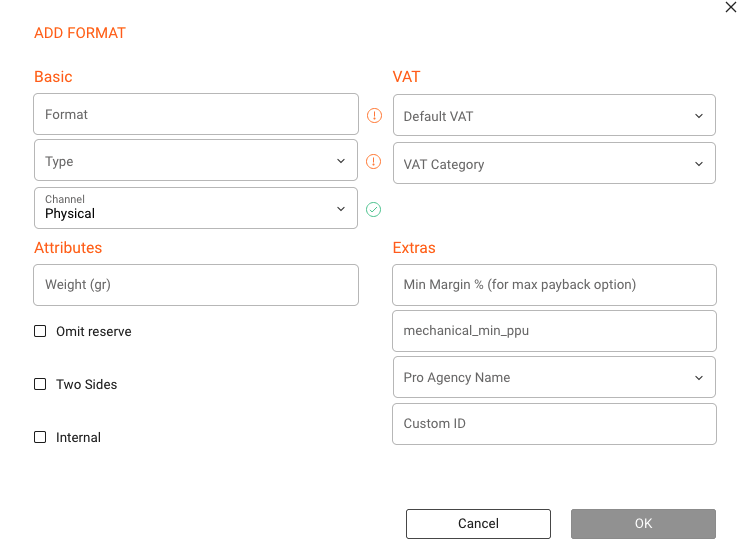
Core
- Channel: Digital or Physical. This determines which royalty ruleset can apply. Treat this as immutable once in use.
- Type: Mark whether the release is a Single, EP, Album, etc. Used for classification and reporting.
Tax (VAT)
- VAT1: full VAT rate.
- VAT2: reduced VAT rate.
- NoVAT: no VAT (rare; for VAT-exempt products).
Cross border sales: VAT settings influence how invoices are calculated for shops in different countries.
Weight
Define a default weight per format to support shipping cost estimates. Product-level weight can override the format’s default.
Reserves
- Omit Reserve: prevents reserve creation for this format.
Background: Used when returns are unlikely (e.g., limited editions).
Other attributes
- Two Sides: relevant for vinyl/media.
- Internal: for non-retail/internal formats.
Extras (advanced)
- Minimum Margin: protects margin under exchange rate fluctuations.
- Mechanical Min PPU: minimum per-unit mechanical.
- PRO Agency Mapping: maps formats to external systems.
- Custom ID: legacy field (avoid using).
Deleting formats
- Only possible if not used by any product.
- Reassign products before deleting obsolete formats.

Format Groups
Use groups to bundle formats sharing the same royalty rules (e.g., VINYL group).
Tip: Keep group names short and consistent.
Where groups are used
In LABEL / ROYALTY / CONTRACT / RATES, Format Groups are used for Physical royalty rules.
Best practices
- Decide Digital vs Physical early.
- Keep formats simple.
- Use groups for rules.
- Define defaults (VAT, weight).
- Use advanced fields only if needed.