
On Settings / Accounting you can add and customize settings related to ”details” / ACCOUNTING such as Money Accounts, Tax Types and Cost Groups.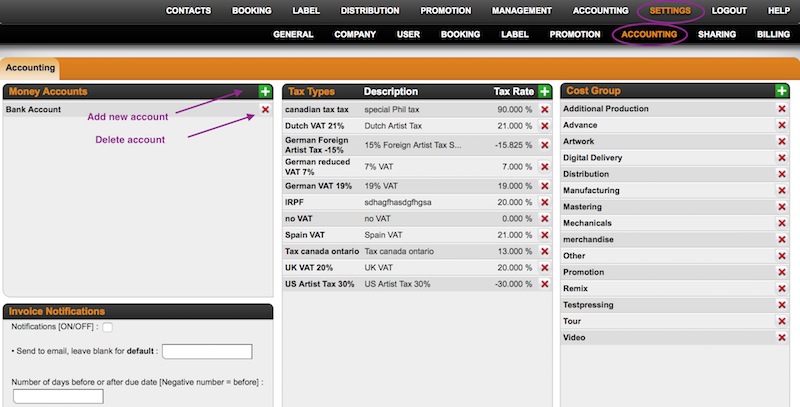
Money Accounts can be normal bank accounts, paypal accounts or a cash box.
To add a new money account, click on the green PLUS icon on top right of the Money Account box and enter name and details.
You can EDIT an existing money account by clicking the BOLD account title. To DELETE a money account, you need to click a red x icon in the list.
Tax Types are customizable tax rates related to your products and services.
You can add a new tax type by clicking the green PLUS icon on top right of the Tax Type box. Enter name, description and rate and confirm with OK.
You can also choose to withhold a tax type by default, just tick WITHHOLDING TAX.
NOTE: Make sure the tax rate has a leading minus for tax deductions.
To EDIT an existing tax type, click on the BOLD tax type. To DELETE a tax type, you need to click a red X icon in the list.
With Cost Groups you can categorize your expenses. 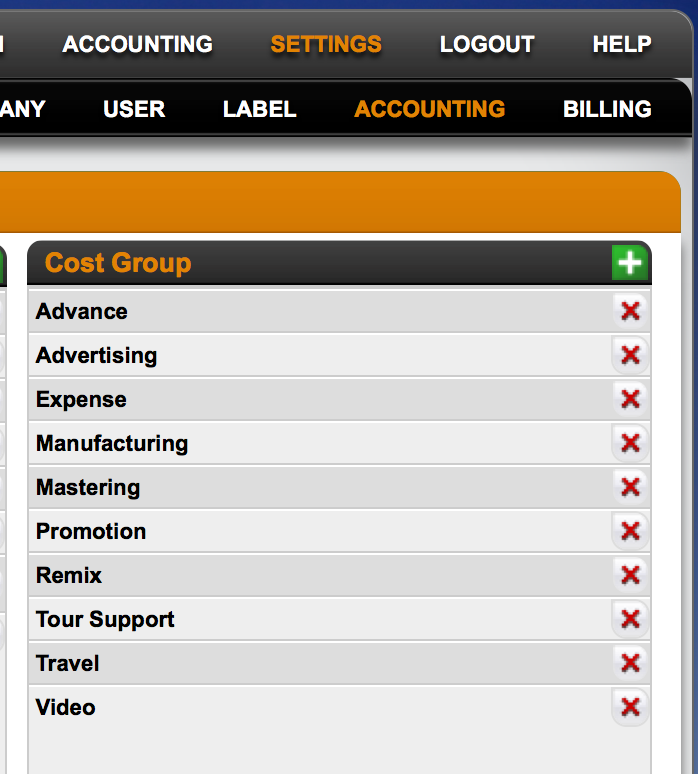
Please note also RECOUPABELES are accounted by cost groups. ”details” automatically identifies the costs by its cost group so that these will be accounted according to your royalty settings.
To add a new cost group, click the green PLUS icon on top right of the Cost Group box, enter the name and confirm with OK.
You can delete a cost group with the red X icon.
Accounting Settings
Recently Viewed
Your recent pages